


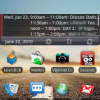
Android Agenda Widget: Stay on Schedule!
Android Agenda Widget is a completely customizable homescreen calendar that will make sure you don’t forget any meetings, birthdays, or appointments!
- Version: 1.2.0
- Size: 416KB
- Category: Productivity
- Price: Free

This calendar widget comes with support for Google Calendar, some corporate calendars, and the Astrid Task/To do List app. One of the first things you’ll notice about this widget is its great user-interface and its large list of customization options. You’ve got options for different layout themes, skins, widget sizes/styles, text sizes, click customizations, and a whole lot more. You can definitely tailor this widget to fit exactly what you want.

Clicking on an event from the widget brings up the detailed view which includes all of the pertinent information like date, time, location, description, attending?, and stored reminders. Additionally, adding an event is as simple as clicking the ‘+’ button on the widget itself. Since the widget syncs directly with the calendars you setup, information added from your phone will be imported directly into the original source calendar as well.
Pros:
- Advanced customization options to personalize the widget’s appearance and functionality
- Attractive user-interface complements your homescreen
- Multiple calendar support with two-way sync
- Active developer constantly striving to improve widget from your feedback
Areas for improvement:
- Possible compatibility issues with Droid (unconfirmed)
Conclusion: One of the best calendar widgets for Android. Now you can stay up-to-date directly from your homescreen!

Top Android App: LauncherPro Beta
Hey guys! Hows it going out there in Android land? John Pariah here, and I’m going to take you on a little journey. A journey to the world of LauncherPro BETA, which is a FREE application available on the Android Market, to replace your current Home screen, so let’s dive in, shall we?
LauncherPro Beta:
- Version: 0.3.0
- Size: 1.18 MB
- Category: Productivity (Home Replacement)
- Price: Free
- Overall Rating: 5/5
Tired of Helix Launcher? Don’t want to fuss with PandaHome or aHome or one of the other dozen Home Replacement apps? Still using the stock launcher? Then you’re going to want to check out LauncherPro Beta from Federico Carnales, available for FREE on the Android Market! Launcher Pro is the newest Launcher Replacement app to flood the Android Marketplace. This launcher is simple, fast, and very user friendly. It rivals the current cross-bearer of the Stock Android home replacement apps, Helix Launcher in terms of speed, look, and usabillity, and it’s one of the best launchers I’ve used!
Screenshots:
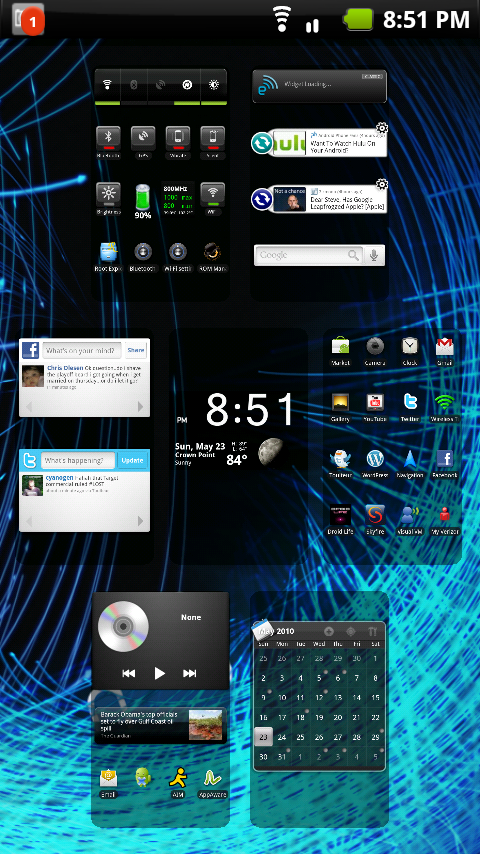
HTC Leap / Apple Expose Style Home View
Main Menu
Pros:
- Speed, speed, speed, speed, speed.
- 7 home screens
- Sleek look
- Easy to navigate menu
- HTC Sense UI Style “Expose” feature, see all 7 home screens at once!
- Fly in effect in the App Drawer, gives it a very sleek entrance and look
Areas for improvement:
- A little bit bigger in file size than Helix Launcher (1.18 MB vs 823KB)
- It is still a BETA application, so I have gotten a few random Force Closes. A quick permission fix check in ROM Manager will fix this (if you’re rooted that is)
Tips:
- On the main screen, you can Pinch-To-Zoom to get the Expose style display, you can also simply press the home button!
- To change the default icons on the bottom (4 total, just like Helix!), you need to LONGPRESS on the icon. A menu will popup asking you what shortcut you would like to put in that spot.
- No “3D” app drawer that everyone loves.
Conclusion: LauncherPro Beta is a worthy contender to the Home Replacement app crown-currently held by Faruq’s Helix Launcher 1 and 2. If you want a stupidly fast, easy to use home launcher, check it out. If you want the HTC Leap / Apple Expose style screen display-than check it out! if you want customizable hard icons at the bottom of each screen-than my friend, you NEED to check this app out! Scan the QR code for more!

Top Android App: UPS Shipping
Amazon and eBay users rejoice, UPS has delivered their official Android app! Now you can easily track packages in real-time directly from your Android phone.
- Tracking packages
- Create shipping labels
- Find nearest UPS Stores, Customer Centers, Drop Box, or authorized Shipping Outlet
- Quote the shipping price of a package
- Check time in-transit
Top Android App: 3banana Notes
One of the easiest ways to take notes on the go is the top Android app, 3banana. You’ll be impressed with it’s simplicity and ease of use, read on! (Thanks to froli13 for reminding us of this great app)
Application: 3banana
Version: 1.17
Size: 267KB
Category: Productivity
Price: Free
Overall Score: 4.7/5
User Interface: 4.5/5
Ease of Use: 5/5
Customizability: 4.5/5
Originality: 4.5/5
Indispensability: 5/5
We’ll cut to the chase and let you know the greatest features of 3banana that you’ll enjoy using right away.
Pros:
- Sync with Google account or Snaptic.com
- Take and attach photos to notes
- Organize notes into labels with #hashtags
- Share via email, Facebook, Twitter, or QR codes
- Homescreen widget for quick note-taking access
- Pin notes to homescreen to remind yourself
- Global search support
- Read notes offline
Top Android App: Swype Keyboard (Reader Review)
Swype is an innovative keyboard for Android which allows you to enter text by sliding from letter to letter rather than tapping. This allows for quick, one handed typing with few errors. There is a bit of a learning curve, but once you’ve got it down, it could very well change the way you think about typing on your Android device.
Swype Beta is officially open on their website at beta.swype.com
Thank you to @zachdrouin for providing this review for Best Android Apps Review. Please follow him on Twitter!
Application: Swype
Version: .35
Size: 9.25MB
Category: Productivity
Price: Free – Beta
Overall Score: 4.7/5
User Interface: 5/5
Ease of Use: 4.5/5
Customizability: 4.5/5
Originality: 5/5
Indispensability: 4.5/5
Here is a video tutorial of Swype on Android:
A lot has been made of comparing the various smartphone onscreen keyboards and often is a major sticking point when switching between platforms. One of the great things about Android is the ability to customize many aspects of the OS and Swype is one of many keyboard options available. The concept behind Swype is very simple: type by dragging your finger (without lifting your finger) from letter to letter to form a word.
What makes Swype incredible is that it is smart, really smart. It does an amazing job of selecting the right word based on the path you trace. In fact, most of the “learning curve” associated with using Swype is becoming comfortable with trusting the selection. That isn’t to say that it doesn’t take a bit of time to get up to speed on Swype, but no more so than switching to any new mobile keyboard, physical or onscreen. The Swype team provides a set of tutorials that are extremely useful.
You have the option of “tap-typing” like you would on the default Android keyboard. This is how you teach Swype words that are not in the dictionary. Once you enter the word, Swype learns it and will incorporate it into future text entry.
While the default settings work just fine, there is a bit of customization you can do in Swype. You can adjust the sensitivity and speed of your paths as well as a number of aesthetic elements. Visually the keyboard might not be as pretty as the default, but it more than makes up for it in functionality. It works in landscape or portrait mode and even has a “control mode” with navigations options, something I wish the default Android keyboard had.
Overall, one-handed typing speed is significantly faster using Swype. I find that my speed using two thumbs in landscape is still a bit faster than using Swype, but perhaps that has to do with the lack of multitouch implementation (please Google!). I would highly recommend trying out Swype, especially if you send a lot of short messages. The combination of innovation, speed, and ease of use makes Swype one of the top Android apps.
Follow the author of this Reader Review on Twitter: @zachdrouin
Read More

![Best Android Apps Review Google+ Page [Giveaway - OVER]](../../../../wp-content/uploads/2011/07/Top-Android-App-Google--Icon-40x40.png)


